Log Analyser
Modular Python CLI tool for parsing and analyzing large-scale log files with high-performance regex and structured reporting.
Gallery
Project Overview
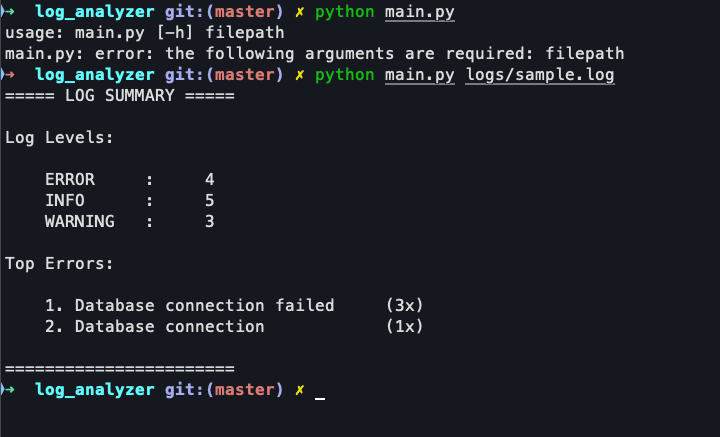
Log Analyser is a specialized CLI utility built to solve a common developer problem: extracting meaningful insights from messy, high-volume log files. Instead of manually searching through thousands of lines, this tool provides a structured summary of log levels and the most frequent error messages.
Technical Implementation
The project is built with a focus on clean code and performance, using a modular approach that follows the Single Responsibility Principle.
High-Performance Parsing
The heart of the tool is a robust parser that uses pre-compiled regular expressions. By using named capture groups (e.g., (?P<level>...)), the parser efficiently extracts:
- Timestamps
- Severity Levels (INFO, WARNING, ERROR, CRITICAL)
- Message Content
The use of generators (line-by-line processing) ensures that the tool can handle files much larger than the available RAM without performance degradation.
Data Analysis
For statistical analysis, I leveraged Python’s collections.Counter. This allowed for near-instantaneous counting of log occurrences and efficient identification of the n most frequent error messages using the .most_common() method.
Modular Architecture
The codebase is strictly organized into four key modules:
parser.py: Handles text extraction and regex matching.analyzer.py: Performs statistical computations on the parsed data.reporter.py: Formats and prints the final report using advanced f-string alignment.main.py: Acts as the orchestrator and handles CLI arguments viaargparse.
Why this project?
While many log analysis tools exist, this project serves as a testament to my ability to:
- Build dependency-free tools that work out of the box.
- Apply Software Design Patterns (Separation of Concerns) in a scripting context.
- Write optimized Python for text processing tasks.
It’s a practical example of creating custom tooling to improve developer workflows.
Project Details
Objective
Create a lightweight, dependency-free utility to help developers quickly identify error patterns and log statistics from large text files.
Theme
Technical and minimalist CLI tool aesthetic.
Date
March 19, 2026